
Dealing With Fire: Building Your QA Crisis Management Strategy (Part 4)
Quality crises happen. A hotfix derails another feature. A third-party service breaks your checkout flow. A bug slips through, and your inbox lights up. The question isn't if but when.


The teams that handle these moments well aren't just fast. They're prepared. They’ve invested in the systems, tools, and workflows that keep outages from turning into disasters. That means:
- Incident response tools that route alerts, manage escalations, and bring the right people into the conversation.
- Testing and monitoring systems that catch issues before they reach production, and surface root causes when they do.
- Communication channels that keep internal teams aligned and customers informed.
- Chaos engineering and resilience practices that help you find the cracks before real pressure exposes them.
In this section, we’ll walk through each layer of this toolkit. We will focus on the practical side of QA crisis planning and crisis management.
In the first three parts of this series, we covered what a QA crisis looks like, how to respond, and how to learn from incidents. This final part focuses on the tools and systems that make that strategy real.
Incident Management Platforms
When production breaks, speed and clarity are non-negotiable. An incident management platform helps your team respond faster, escalate smarter, and coordinate efficiently without chaos.
These tools are more than just alerting systems. Through real-time collaboration channels, they centralize the entire response workflow and document what happens as it unfolds.
This leads to faster resolution, less finger-pointing, and more accurate postmortems.
Here are four widely adopted platforms used by high-performing QA and SRE teams:
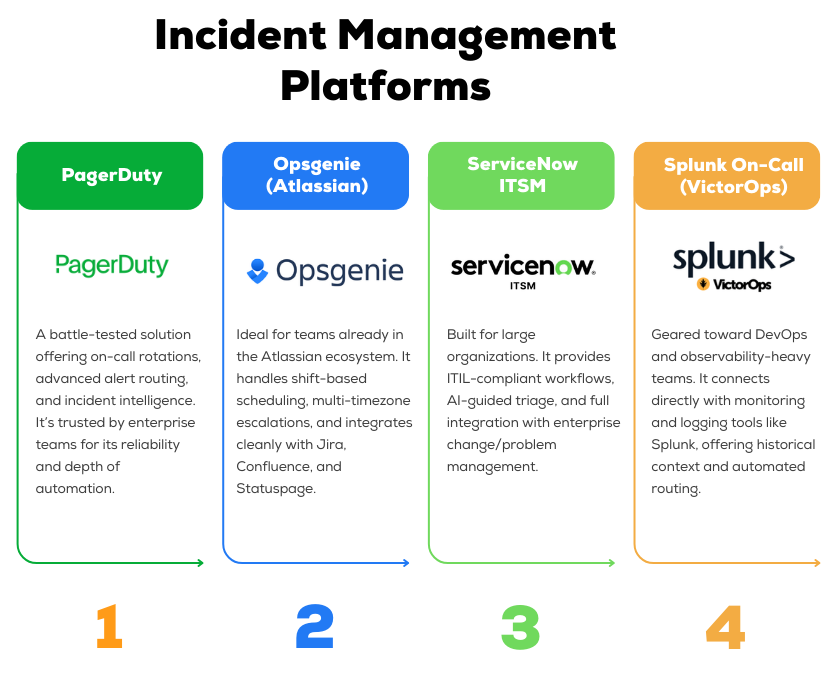
Use this table to sanity-check against your team’s needs and workflows.
When you evaluate incident management tools, a few capabilities matter more than anything else.
These are the features that directly affect how fast your team detects issues, mobilizes the right people, and learns from each incident.
- Alert automation from your observability stack
- Escalation rules that match your team structure
- Runbooks and documentation triggers built into workflows
- Mobile access for quick response from anywhere
- Integration with Jira, CI/CD, and chat tools
- Postmortem workflows that drive real improvement
Every minute counts in a crisis. The right platform will help you learn and improve after the event is over.
Testing & Monitoring Tools
Preventing a crisis is always cheaper than reacting to one.
QA teams rely on well-integrated testing and observability stacks to catch issues early and understand them quickly.

Automated Testing
A strong testing foundation starts with test automation. Tools like Selenium, Playwright, and Cypress help you build reliable end-to-end coverage across critical user flows.
Cypress stands out for its developer-friendly setup and speed, while Playwright is a solid pick for cross-browser support.
At the unit level, frameworks like JUnit, TestNG, and pytest help developers catch logic errors early, where fixes are cheaper and faster.
For performance validation, tools like Apache JMeter, Gatling, and K6 simulate load conditions that expose scalability limits before users hit them.
Monitoring and Observability
Even with robust testing, some issues will make it to production. That’s where monitoring and observability come in.
Application Performance Monitoring (APM) platforms like Datadog, New Relic, and Dynatrace provide real-time dashboards of latency, error rates, and throughput.
They help your team detect anomalies fast and drill into the root cause without wasting time.
Many engineering teams also rely on open-source tools like Prometheus and Grafana for custom metrics and dashboards, especially when they want full control over what gets tracked.
Log aggregation tools like Splunk and the ELK Stack (Elasticsearch, Logstash, Kibana) allow teams to search across distributed systems and reconstruct what happened when things go wrong.
Focus on your critical paths and failure indicators so you know about problems before your customers do.
Synthetic Monitoring
Think of synthetic monitoring as your early warning system. These tools simulate user behavior at regular intervals to catch issues in real time.
When a synthetic test fails, it’s often the first signal that something is broken, even before your monitoring dashboard lights up or support tickets arrive.
It’s especially useful for guarding critical journeys where a single point of failure can create outsized impact.
Synthetic checks won’t replace real monitoring, but they complement it. They help you see your system the way your users do.
Test Management Platforms
As your QA efforts scale, so does the complexity of managing them. That’s where test management tools like TestRail, Xray (for Jira), and Qase come in.
These platforms give you a single source of truth for test cases, execution results, and coverage reporting.
You can track both manual and automated tests, link them to user stories or bug reports, and visualize test performance across releases.
Communication & Documentation
In a crisis, silence creates confusion. Clear, timely communication keeps your team focused, leadership informed, and customers reassured.
The goal is to keep everyone aligned without creating noise or distraction. Your communication setup should be just as intentional as your testing and monitoring stack.
Here’s what it should include.
Real-Time Team Coordination
Tools like Slack or Microsoft Teams serve as your incident war room.
Create a dedicated channel the moment an issue is confirmed (e.g. #incident-login-502) and invite only the necessary responders.
Use video calls through Zoom or Google Meet when situations escalate or when decisions require immediate alignment.
According to Atlassian, teams that combine real-time chat with video tend to resolve incidents faster and with fewer missteps, thanks to better context and reduced back-and-forth.
Status Pages and Stakeholder Updates
While the technical team handles the response, stakeholders need visibility. Status pages are essential for that.
Tools like Atlassian Statuspage allow you to share real-time updates with internal teams or customers without slowing down your responders.
For internal-only incidents, a pinned Slack message or Confluence update can work just as well.
Updates should be timely, clear, and posted in one place where everyone knows to look.
This avoids duplicate questions, reduces internal interruptions, and builds trust that the situation is under control.
Runbooks and Incident Documentation
No one should be guessing during a crisis. Every common failure scenario should have a documented runbook, stored in a central location like Confluence, Notion, or your internal wiki.
Runbooks should include:
- Step-by-step response instructions
- Contacts for each system or service
- Escalation paths
- Communication checklists (where to post, who to notify, what to say)
After each incident, update your documentation. Add what worked, what didn’t, and any new steps discovered during the response.
Chaos Engineering Tools
To build resilience, many teams inject failure in a controlled way. Chaos engineering tools let you stress-test your system under adverse conditions:
- Chaos Monkey (Netflix): Originally developed at Netflix, Chaos Monkey randomly terminates servers in production to test system resilience. It’s now part of Netflix’s Simian Army of chaos tools.
- Gremlin: A commercial chaos-engineering platform that can safely inject failures (CPU spikes, packet loss, etc.) across cloud environments.
- Chaos Toolkit: An open-source framework for defining and running chaos experiments on any system.
- Chaos Mesh: A Kubernetes-native chaos framework for cloud-native apps; it can simulate pod/container failures, network partitions, and I/O stress in K8s clusters.
With these tools, you can simulate real-world failure modes like node crashes, service latency spikes, network outages, or even entire region failures.
For example, you might throttle database responses or disconnect a downstream API to see if fallbacks kick in.
The goal is to expose unknown weaknesses: as one analogy puts it, chaos engineering is like “injecting harm (like latency, CPU failure, or network black holes) in order to find and mitigate potential weaknesses.
Focus on your system’s key failure points. Test instance/container crashes, resource exhaustion (CPU/memory), network latency/partitioning, and regional outages (multi-az failover).
Also simulate critical dependency failures (e.g., kill the payment gateway or auth service).
Follow the core chaos principles: form a hypothesis, start with the smallest experiment, and then observe the outcome.
Begin in a non-production environment to minimize risk, then gradually introduce chaos in production as confidence grows.
Always have monitoring and rollback mechanisms in place.
Over time, these controlled failures help you build confidence that your system can indeed “withstand turbulent conditions in production”.
From Firefighting to Fire Prevention
Quality crises are inevitable in software development. What determines their impact is how you prepare for them, how you respond in the moment, and how you learn afterward.
By adopting prevention strategies like shift-left testing and quality gates, establishing clear response frameworks with defined roles, and building a culture of blameless learning, your QA and QE teams can shift from reactive firefighting to proactive risk management.
Remember the core principles. Prevention is always cheaper than cure. Clear communication reduces chaos.
Blameless postmortems turn failures into education. And the best crisis management strategy is the one you have practiced before you need it.
Start small. Define your severity classification today. Schedule your first game day drill next month. Build your first runbook next week.
Crisis management is not built overnight, but every step makes your team more resilient.
But building and maintaining comprehensive crisis management practices requires significant resources and expertise.
Many organizations struggle to balance proactive quality engineering with day-to-day testing demands, especially when facing tight deadlines and limited QA capacity.
Testlio's community of expert testers provides flexible capacity to strengthen your quality processes before crises occur and rapid response capabilities when they do.
Our managed testing services integrate with your existing workflows, providing expertise in test automation, security testing, performance validation, and more.
Whether you need to scale testing for a critical release or build more robust prevention practices, Testlio brings experience from testing thousands of products across every industry.